Yaml
works on helm v3.9.3
Project
Reserved for future.
Version
Helmwave will check current version and project version.
In the future it is planned to be used for major compatibility.
Registries[]
OCI registries
| field | required | type | default |
|---|---|---|---|
| host | ✅ | string | "" |
| username | string | "" | |
| password | string | "" | |
| insecure | bool | false |
Examples
Repositories[]
| field | required | type | default |
|---|---|---|---|
| name | ✅ | string | "" |
| url | ✅ | url | "" |
| username | 🙅 | string | "" |
| password | 🙅 | string | "" |
| certfile | 🙅 | string | "" |
| keyfile | 🙅 | string | "" |
| cafile | 🙅 | string | "" |
| insecureskiptlsverify | 🙅 | bool | false |
| force | 🙅 | bool | false |
name
Local name alias
url
URL for chart repository
force
Don't skip if repository exists.
Releases[]
Almost all options that are here are native helm options
| field | required | type | default | helmwave build |
helmwave up |
|---|---|---|---|---|---|
| name | ✅ | string | "" | ✅ | ✅ |
| namespace | ✅ | string | "" | ✅ | ✅ |
| chart | ✅ | string or object | {} | ✅ | ✅ |
| description | 🙅 | string | "" | ||
| depends_on | 🙅 | array | [] | ✅ | |
| allow_failure | 🙅 | bool | false | ✅ | |
| values | 🙅 | array | [] | ✅ | ✅ |
| tags | 🙅 | array | [] | ✅ | |
| store | 🙅 | object | {} | ✅ | |
| timeout | 🙅 | interval | 0s | ✅ | |
| max_history | 🙅 | int | 0 | ✅ | |
| create_namespace | 🙅 | bool | false | ✅ | |
| reset_values | 🙅 | bool | false | ✅ | |
| recreate | 🙅 | bool | false | ✅ | |
| force | 🙅 | bool | false | ✅ | |
| atomic | 🙅 | bool | false | ✅ | |
| cleanup_on_fail | 🙅 | bool | false | ✅ | |
| subnotes | 🙅 | bool | false | ✅ | |
| disable_hooks | 🙅 | bool | false | ✅ | |
| disable_open_api_validation | 🙅 | bool | false | ✅ | |
| wait_for_jobs | 🙅 | bool | false | ✅ | |
| wait | 🙅 | bool | false | ✅ | |
| skip_crds | 🙅 | bool | false | ✅ | |
| devel | 🙅 | bool | false | ✅ | |
| reuse_values | 🙅 | bool | false | ✅ |
name
Release name
I hope you know what it is.
namespace
Kubernetes namespace
create_namespace
if
trueHelmwave will create the release namespace if not present
timeout
time to wait for any individual Kubernetes operation
Chart Options
| field | required | type | default |
|---|---|---|---|
| name | ✅ | string | "" |
| version | 🙅 | string | "" |
| username | 🙅 | string | "" |
| password | 🙅 | string | "" |
| certfile | 🙅 | string | "" |
| keyfile | 🙅 | string | "" |
| cafile | 🙅 | string | "" |
| insecureskiptlsverify | 🙅 | bool | false |
Values option
| field | required | type | default |
|---|---|---|---|
| src | ✅ | string | "" |
| strict | 🙅 | bool | false |
| render | 🙅 | bool | true |
🗳️ Store
It allows to pass your custom fields from
helmwave.ymlto values.
It works when you call $ helmwave build
🔖 Tags
It allows you to choose releases for build
It works with next options when you call $ helmwave build:
--tags value, -t value  It allows you choose releases for build. Example: -t tag1 -t tag3,tag4 [$HELMWAVE_TAGS]
--match-all-tags        Match all provided tags (default: false) [$HELMWAVE_MATCH_ALL_TAGS]
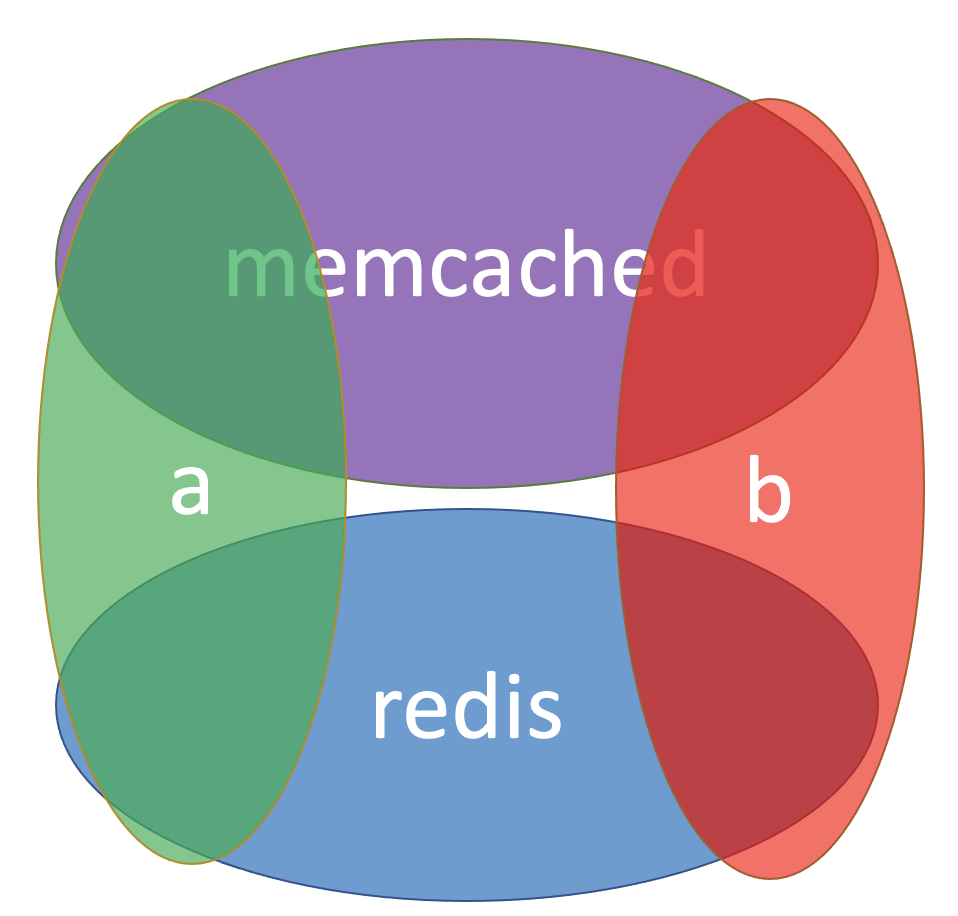
Matching with tags
Suppose we have next helmwave.yml with 4 releases.
- redis-a
- redis-b
- memcached-a
- memcached-b
repositories:
- name: bitnami
  url: https://charts.bitnami.com/bitnami

releases:
- name: redis-a
  namespace: test
  chart:
    name: bitnami/redis
  tags:
  - a
  - redis

- name: redis-b
  namespace: test
  chart:
    name: bitnami/redis
  tags:
  - b
  - redis

- name: memcached-a
  namespace: test
  chart:
    name: bitnami/redis
  tags:
  - a
  - memcached


- name: memcached-b
  namespace: test
  chart:
    name: bitnami/memcached
  tags:
  - b
  - memcached
Match all redis
helmwave build -t redis
[🙃 aka INFO]: 🏗 Plan
        releases:
          - redis-a@test
          - redis-b@test
Match the group a
helmwave build -t a
[🙃 aka INFO]: 🏗 Plan
        releases:
          - redis-a@test
          - memcached-a@test
Match multiply group.
If you know SQL. It looks like that:
SELECT * FROM releases WHERE tag = "redis" OR tag = "a"
helmwave build -t redis -t a
[🙃 aka INFO]: 🏗 Plan
        releases:
          - redis-a@test
          - redis-b@test
          - memcached-a@test
All that was above, we used the logical OR operator.
If you need strongly logic with AND you should use --match-all-tags flag.
This flag changes logic for query releases.
If you know SQL. It looks like that:
SELECT * FROM releases WHERE tag = "redis" AND tag = "a"
helmwave build -t redis -t a --match-all-tags
[🙃 aka INFO]: 🏗 Plan
        releases:
          - redis-a@test
depends_on
It allows waiting releases
It works when you call $ helmwave up
Example for 3-tier application
Your helmwave.yml will
releases:
  - name: frontend
    depends_on: backend@test
    namespace: test

  - name: backend
    depends_on: db@test
    namespace: test

  - name: db
    allow_failure: false
    namespace: test
allow_failure
When allow_failure is set true. It allows the installation to proceed.
pending_release_strategy
Strategy to handle releases in pending statuses (
pending-install,pending-upgrade,pending-rollback)
If helmwave tries to upgrade release that is currently in one of pending statuses it will follow specified strategy:
""(or not specified) - do nothing. Helm will fail in this caserollback- rollback release to previous version. Upgrade will happen after rollback is completeuninstall- uninstall release. Upgrade will happen after uninstall is complete